Feeling desperate, he turned to his phone and stumbled upon a lively YouTube ad that seemed to offer a solution: "Get Instant Loans with Easy EMI Options - No Credit Check!
Rohan, grasping for hope, clicked on it, unaware of the potential trap he was stepping into.
Intrigued, Rohan clicked on the ad and downloaded the app, "ZIffySwift Loan India”. The app promised quick approval and low-interest rates, which seemed like a lifeline in his dire situation. The registration process was smooth, and the app's interface felt trustworthy. However, as Rohan navigated through the application, the app began asking for more and more personal information.
"Please upload your Aadhar card and PAN card," it requested. "Provide your bank account details and a selfie for verification," it continued. "Share your personal details and employment records," it insisted.
Despite a moment of hesitation, Rohan complied, driven by the urgency of his need.
Within days, Rohan's nightmare unfolded.
His bank account saw unauthorized withdrawals, and his personal details were used for multiple fraudulent loans.
What initially appeared as a ray of hope quickly spiraled into a storm of financial turmoil, dip in credit score, pesky/spam and threatening calls from debt collectors and identity theft. Permissions that request personal information can allow bad actors to collect a lot of user data, jeopardizing privacy and security.
Fraudulent apps often misuse these permissions to exploit unsuspecting users. They can gather extensive personal and financial information, leading to severe consequences.
Reports have repeatedly highlighted how such permissions are misused from the android app security perspective, turning seemingly helpful apps into tools for data theft and fraud.
Source
In fact, India’s finance Minister herself opined and addressed the rise of illegal loan apps, which exploit vulnerable people with high interest rates and predatory practices.
Even though the rules have tightened, such instant personal loan apps still manage to slip through the net on platforms(e.g., Google Play Store). Google weeded out more than 2,000 risky loan apps but the cat-and-mouse game continues, as these apps keep finding new ways to sneak in. Apple too tried to catch smoke with bare hands, when it responded to user grievances by removing such apps from its App Store in India.
These actions highlight ongoing efforts to combat the issue but also show how persistent and adaptable these malicious apps can be.
So how do fake loan apps extract personal and financial information from users?
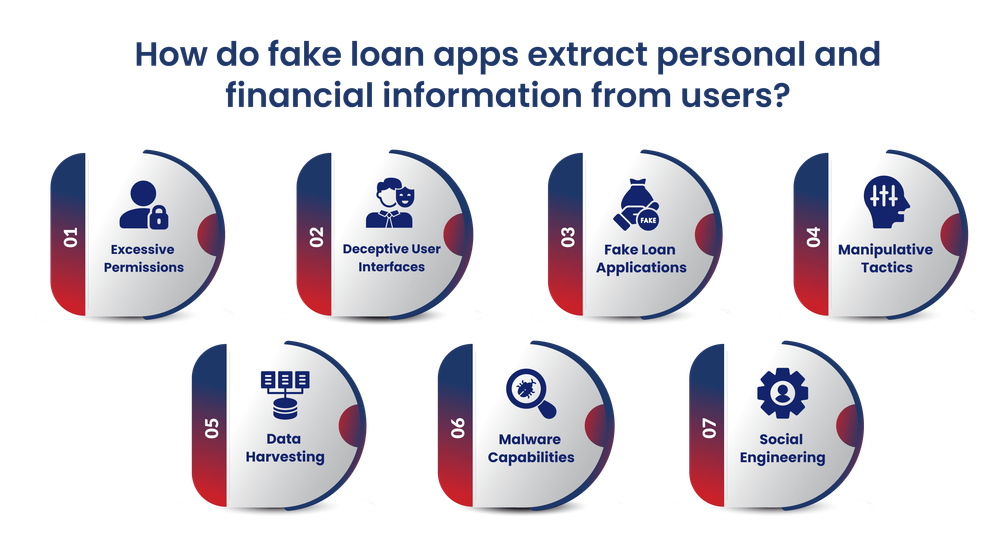
Fake loan apps employ misleading and dishonest methods to collect personal and financial data from users who are unaware of the scam. Here are some common methods these malicious apps employ:
- Excessive Permissions : Fake loan apps request excessive permissions beyond what is necessary for a legitimate loan app, such as access to contacts, photos, SMS messages, call logs, and other sensitive data. By granting these permissions, users unwittingly open the floodgates, allowing the phishy apps to delve into and swipe their personal information, contacts, and media files.
- Deceptive User Interfaces : These apps often mimic the user interfaces of legitimate loan providers, using similar branding, logos, and design elements to appear trustworthy. This deception tricks users into providing personal and financial details, thinking they are dealing with a genuine lender.
- Fake Loan Applications : Fake loan apps require users to fill out loan application forms, requesting sensitive information such as name, address, phone number, email, income details, and government-issued ID numbers (e.g., Aadhaar, PAN).
- Manipulative Tactics : The apps may promise quick loans with minimal documentation or claim that providing personal information is a mandatory requirement for loan approval.
- Data Harvesting : Once installed, these apps can silently harvest data from the user's device, including contacts, SMS messages, call logs, photos, and other media files. You never know if these could be transported to the app operators' servers for exploitation or sale on the dark web.
- Malware Capabilities : Some advanced fake loan apps may contain malware components that can further compromise the user's device, enabling more extensive data theft or even remote-control capabilities.
- Social Engineering : Fake loan apps may employ social engineering tactics, such as creating a sense of urgency or exploiting users' financial vulnerabilities, to persuade them to share sensitive information.
What do Android App Permissions Share with fake loan apps?
The Open-Source nature of Android has been a matter of concern for so many. In fact, Apple also has been facing the heat. And as we talk about what we, as users, share with such kinds of applications that need specific information about collecting personal information, certain features, contacts, and media files etc. we should rethink about being an easy giver.
So, let's dive in and learn about the 8 key permissions, what they do, how they work, and the potential risks they pose.
- android.permission.READ_PRIVILEGED_PHONE_STATE
The android.permission.READ_PRIVILEGED_PHONE_STATE permission lets an app access sensitive phone state information like the device's IMEI, IMSI, SIM serial number, and other unique identifiers that can't be reset.
How it works: This permission is tightly controlled, usually granted only to system apps or apps with carrier privileges. It allows access to sensitive device identifiers that aren't available to typical third-party apps.
Threats: If this permission gets misused, it can seriously invade your privacy. It could give access to your device's unique identifiers, allowing people to track you, build a profile on you, or even get into your user accounts and services.
2. android.permission.BIND_ACCESSIBILITY_SERVICE
The android.permission.BIND_ACCESSIBILITY_SERVICE permission lets an app connect to your device's accessibility services, which further helps these phishy lending apps to interact with devices, like reading the screen content, performing gestures, and capturing user input.
Here's how it works: With this permission, apps can keep an eye on and interact with the user interface, see what's on active windows, perform gestures, and capture user input, making the device more user-friendly for those who need these features.
Watch out for these threats: If this permission is used in the wrong way, it could be used for overlay attacks, keylogging, and unauthorized access to sensitive information. This means that malicious apps could be able to keep an eye on your activity and get hold of important data like passwords.
3. android.permission.BIND_ACCESSIBILITY_SERVICE
The android.permission.BIND_ACCESSIBILITY_SERVICE permission lets an app connect to your device's accessibility services, which further helps these phishy lending apps to interact with devices, like reading the screen content, performing gestures, and capturing user input.
Here's how it works: With this permission, apps can keep an eye on and interact with the user interface, see what's on active windows, perform gestures, and capture user input, making the device more user-friendly for those who need these features.
Watch out for these threats: If this permission is used in the wrong way, it could be used for overlay attacks, keylogging, and unauthorized access to sensitive information. This means that malicious apps could be able to keep an eye on your activity and get hold of important data like passwords.
4. android.permission.RECEIVE_SMS
This permission lets an app receive and read SMS messages on your device. It's often used to verify phone numbers or get OTPs.
How it works: Apps can intercept incoming texts for various purposes, like verifying your number or receiving OTPs.
Watch out for: Misuse can lead to unauthorized access to sensitive info like authentication codes and personal messages. Malicious apps could read and manipulate your texts without you knowing.
5. android.permission.CAMERA
What it is: As the name suggests, this permission grants an app requesting access to the device's camera, allowing it to capture photos and videos.
How it works: Apps with this permission can use the device's camera hardware to take pictures, scan QR codes or record videos. This is typically used for apps that require camera functionality, such as photography or video conferencing apps.
Threats: Misuse of this permission can result in unauthorized recording of images or videos, potentially compromising user privacy. Malicious apps can secretly capture photos or videos without the user's consent.
6. android.permission.RECORD_AUDIO
What it is: The android.permission.RECORD_AUDIO access is essentially a permission that apps need to ask for if they want to use your Android device microphone. With this permission enabled, an app can easily capture audio directly from your device’s microphone and might snoop into voice memos, calls, or other audio features.
How it works: When an app on your Android phone asks and finally gets access for the RECORD_AUDIO permission, it can use the Android MediaRecorder or AudioRecord classes to start recording audio. This captured audio can be processed and stored locally on the device or transmitted to remote servers for further analysis or storage.
Threats: Misuse of this permission can lead to unauthorized audio recordings, potentially capturing private conversations and sensitive information. This can result in significant privacy violations.
7. android.permission.MODIFY_AUDIO_SETTINGS
What it is: This permission allows an app to modify the device's audio settings, such as volume and audio routing.
How it works: Apps with this permission can change audio settings on the device, which can be useful for apps that need to control audio output, such as media players or communication apps.
Threats: While not as critical as other permissions, misuse can lead to disturbances and unauthorized changes to the device's audio configuration, potentially affecting the user experience.
8. android.permission.ACCESS_COARSE_LOCATION
What it is: This permission grants an app access to the device's approximate location using network-based methods (e.g., Wi-Fi and cell towers).
How it works: Apps with this permission can determine the device's location with a lower level of accuracy compared to GPS-based location. This is often used for location-based services that do not require precise location data.
Threats: Misuse of this permission can still be used to track user movements and potentially compromise privacy. It can be exploited to build a profile of the user's location history.
9. android.permission.READ_PHONE_STATE
What it is: This permission allows an app to access information about the device's phone state, including the phone number, current cellular network information, and ongoing call status.
How it works: Apps with this permission can read the phone's state information, which can be useful for apps that need to manage calls or provide telephony services.
Threats: Misuse of this permission can lead to privacy concerns, as it allows access to sensitive information about the device's telephony status. It can be used to track call activity and other telephony-related data.
These permissions, when misused by fake loan apps or other malicious apps, can lead to significant privacy violations, data theft, and harassment. Users should be cautious and review app permissions carefully before granting access.
Protectt.ai Take:
It's crucial to emphasize the importance of user awareness and caution. Understanding how mobile app usage permissions can be exploited by malicious apps is the first step toward protecting your personal information and maintaining your privacy. By being vigilant about the permissions you grant, especially to apps that seem too good to be true, you can significantly reduce the risk of falling victim to scams and data breaches.
Conclusion:
Rohan's story is a stark reminder of the dangers that lurk in seemingly helpful loan apps. By understanding Android app permissions and how they can be misused, you can better protect yourself from falling victim to similar scams. Always scrutinize the permissions requested by any app, particularly those involving sensitive data like your location, camera, microphone, and personal identifiers. Stay vigilant, rely on trusted app sources, and prioritize your digital security to navigate safely in the world of online lending. Protect yourself, just as Rohan wishes he had done.
To know more and have a detailed demo, please get in touch with us on sales@protectt.ai
Protectt.ai is ‘A Leader in Mobile App Security in India.’ Built India’s first SaaS-based, Innovative Mobile App Security platform with Runtime Application Self Protectionacapabilities. Protectt.ai is delivering the next generation Mobile App, Device & Transaction Security Platform with 50+ Mobile App Security features driven by Deep Tech.